See What They Say® At Work

Hamilton® CapTel® for Business delivers employees with hearing loss the captions needed to participate fully in every business call.

Hamilton CapTel partners with Tenacity to provide business captioning solutions that deliver accurate, real-time captions within a Cisco environment. Now, every employee with hearing loss can communicate with clarity and confidence.


Are you a Telecom/HR Administrator?

Business Woman on phone
Hamilton phone
Cisco® 8851 Desk Phone
Hamilton phone
Cisco® 8851 Desk Phone

Cisco Phone Systems

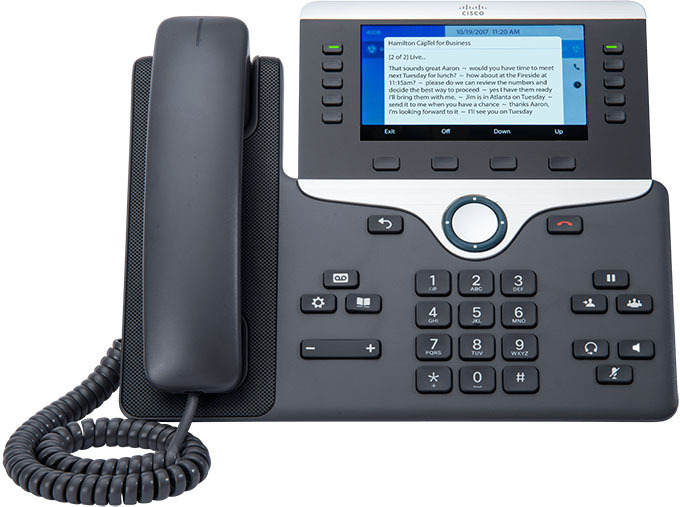
Get Accurate Captions On Your Cisco Desk Phone

All that’s required is a Cisco phone, a Hamilton CapTel for Business license, and a Hamilton CapTel for Business account.
How It Works
captioned phone icon Once implemented, the system connects Cisco phones in-network to Hamilton’s captioning service.
captioning icon Captions are displayed directly on the phone screen – no additional devices required.
thirtyday icon Tenacity, our partner for business solutions, offers a 30-day trial period prior to committing to a 12-month licensing agreement.

See if it works for you
Contact your Human Resources Department, ADA Coordinator, or Telecom Administrator to determine if the Cisco Phone Systems solution is the right fit for your business environment.

Desktop App Tenacity

Available On

available on Windows
available on Mac

Works With

  • Microsoft Teams
  • Google Meet
  • Cisco Webex
  • Zoom
  • RingCentral™
  • MaxUC
  • FaceTime (Mac)
  • And more
Desktop App Tenacity

Desktop Application

Real-Time Call Captions On Your Computer – Wherever You Work

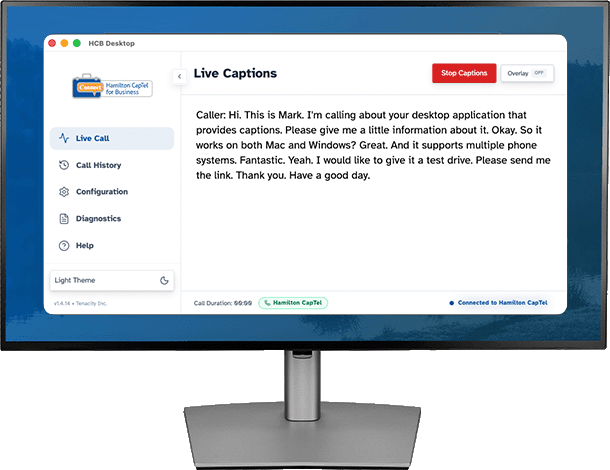
The Hamilton CapTel for Business Desktop App brings enterprise-grade captioning to your computer. Whether you’re on a virtual meeting or a business call, using platforms like Microsoft Teams, Google Meet, Webex, Zoom, Avaya, and RingCentral, Hamilton CapTel works in the background – delivering accurate, real-time captions directly on your screen.

Key Features
Seamless Meeting Detection Icon
Seamless Meeting Detection

Starting captions with the Desktop App is effortless. With one‑click activation – and in some cases, automatic detection when a meeting begins – the app delivers instant, reliable captioning. This ensures every call is accessible from the moment it starts, without extra steps or setup.

Secure Icon
Secure, Enterprise Ready

Sign in with your Hamilton CapTel account and stay connected. A dedicated window launches automatically when your computer starts, ensuring the app is always ready when you are. Getting started is quick, simple, and seamless.

Clean Interface Icon
Clean, Focused Interface

The caption window mirrors the familiar Hamilton CapTel interface and includes a manual Start Captioning button for added control. Captioning auto-terminates when your meeting window closes.

Compatibility Icon
Enterprise Compatibility

The Hamilton CapTel for Business Desktop App is platform agnostic and works on PC and Mac systems without the need to purchase or deploy additional hardware.

Available On

available on Windows
available on Mac

Works With

  • Microsoft Teams
  • Google Meet
  • Cisco Webex
  • Zoom
  • RingCentral™
  • MaxUC
  • FaceTime (Mac)
  • And more
Certification Icon

Compliance & Certifications

The Hamilton CapTel for Business Desktop App is designed to meet accessibility and security standards, ensuring an inclusive experience for all users.

  • TLS 1.2 Encryption
  • FCC Certified
  • HIPAA Compliance
  • 100% Privacy

Are you a Telecom or HR ADA Administrator?

Hamilton CapTel for Business is straightforward to deploy – and we’ll be with you every step of the way.

For HR / ADA Administrators

Meeting your obligation to provide reasonable accommodations for employees with hearing loss now includes captioned telephone options – both for Cisco desk phone environments and modern software-based workflows.

Connect with us to learn how we can help support your accessibility initiatives.

For Telecom Administrators

Your IT team handles installation on employee computers, and Tenacity will provide all required configuration support.

Cisco Phones

To implement the Hamilton CapTel Cisco Phone Systems solution, a Team member will connect your Telecom team with our partner, Tenacity, to discuss software implementation.

  • 30-day trial available before committing to a 12-month licensing agreement
  • Once implemented, sites are recognized in our system – employees gain captioning access using their existing Cisco phones

Register For A Hamilton CapTel Account

Once your Hamilton CapTel for Business solution is implemented, you’ll need a Hamilton CapTel for Business Account. This simple, one-time registration process lets you establish your user account – used to log in to the Hamilton CapTel for Business application on your Cisco phone. Once your account is set up, just open the application, log in with your User ID Number and PIN, and you’re ready to make and receive calls with captions.

Request More Information

To have a Team member contact you, please complete the form below.

Name
Address
Inquiring For
Does your work environment use Cisco® as their telephone system?

* Required field

Contact Information